Counter-Strike 1.6 Cheats
Private Counter-Strike 1.6 cheats with ESP, ready-made configurations and a clean in-game menu, fast updates for game patches and free installation assistance.
Available: 1 cheat
Private Counter-Strike 1.6 cheats with ESP, ready-made configurations and a clean in-game menu, fast updates for game patches and free installation assistance.
Available: 1 cheat
The catalog features private Counter-Strike 1.6 cheats with visual and utility tools. Available solutions may include ESP, ready-made configurations and a clean in-game menu for controlling individual settings.
Players searching for CS 1.6 cheats, hacks, trainers or mods can compare products by their features, compatibility and system requirements. Review the selected product page and check its current status before purchasing.
Depending on the selected product, available options may include:
The exact feature set depends on the selected product and may change after Counter-Strike 1.6 updates.
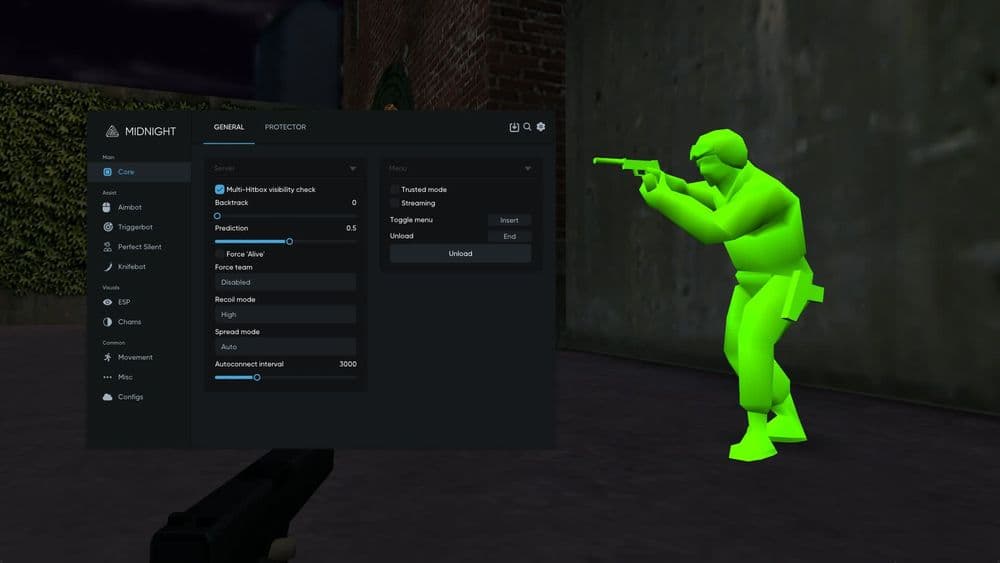
ESP refers to visual tools that display additional game information directly over the main screen. The exact elements and customization options depend on the selected software.
Before playing, users can open the menu and disable unnecessary elements. This keeps the interface clear and limits the overlay to the information they need.
Available CS 1.6 cheats may be controlled through a dedicated in-game menu. Users can enable features, change individual parameters and select a suitable configuration.
A configurable menu makes it easier to adapt the software to the display resolution, game mode and personal preferences. Menu layouts and available settings may vary between products.
Selected Counter-Strike 1.6 cheats provide preconfigured profiles. These allow users to prepare the software without manually adjusting every individual setting.
Different profiles may be designed for different playstyles. Users can also modify the available settings and create a configuration that better matches their preferences.
Before purchasing, check:
Requirements may differ between products. Compatibility listed for one cheat should not automatically be assumed for other or future solutions.
A Counter-Strike 1.6 update may require the software to be adapted to the latest game version. Avoid launching an outdated build until its working status has been confirmed.
Fast patch updates help restore compatibility after changes to the game. The exact release time depends on the developer and the scale of the update.
After payment, users receive product access and installation instructions. The guide explains the steps required to prepare and launch the software correctly.
Free installation assistance is available when additional help is needed. Before contacting support, prepare your Windows version and describe the stage where the issue occurred.
When comparing available products, consider:
The catalog may expand over time, so compare the latest product cards immediately before purchasing.
Third-party software in online games carries a risk of account restrictions. Check the current status of the selected product before every launch.