HypnoCheats
HomeCatalogSupportBlogStatusReviews
Discord
HypnoCheats

Private cheats for popular games. Regular updates, up-to-date builds and technical support for customers.

  • Elitepvpers
  • YouGame
  • OwnedCore

Navigation

  • Home
  • Catalog
  • Support
  • Blog
  • Statuses
  • Reviews
  • FAQ
  • Guarantees

Knowledge base

  • Private vs public cheats
  • What is an HWID ban & spoofer
  • What cheat statuses mean
  • Safe usage basics
  • All articles

Legal

  • Privacy Policy
  • User Agreement
  • Terms of use
  • About us
  • Sitemap

© 2026 HypnoCheats. All rights reserved.

  1. Home/
  2. Catalog/
  3. Rob Run/
  4. Vengeance

Cheat Vengeance

For Rob Run
Undetected
Vengeance

System requirements

Supported game client:
Steam
Supported OS:
Windows 10 & Windows 11
Supported CPU:
Intel & AMD
Supported game modes:
Windowed, Borderless
Anti-cheat:
In-game
Included spoofer:
No
Stream Bypass:
No
Additional:
Exiting the game terminates Discord.exe processes. Ctrl+F4 pauses the session without closing Discord.

Features

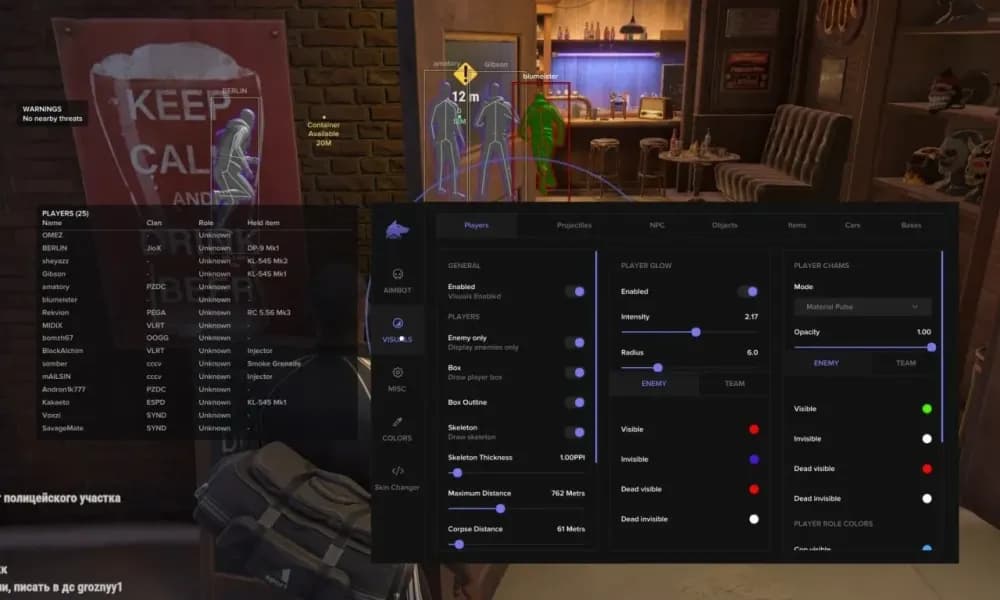
  • Full Version (Aimbot + ESP / World / Radar / Battle Mode / Profiles)
  • Lite Version (ESP / World / Radar / Battle Mode / Profiles, No Aimbot)
  • Menu Key (Right Shift)
  • Aimbot Pauses While Menu Is Open
  • F4 Startup Continuation Key
  • Master Overlay Toggle
  • Separate Visual and Aimbot Activation
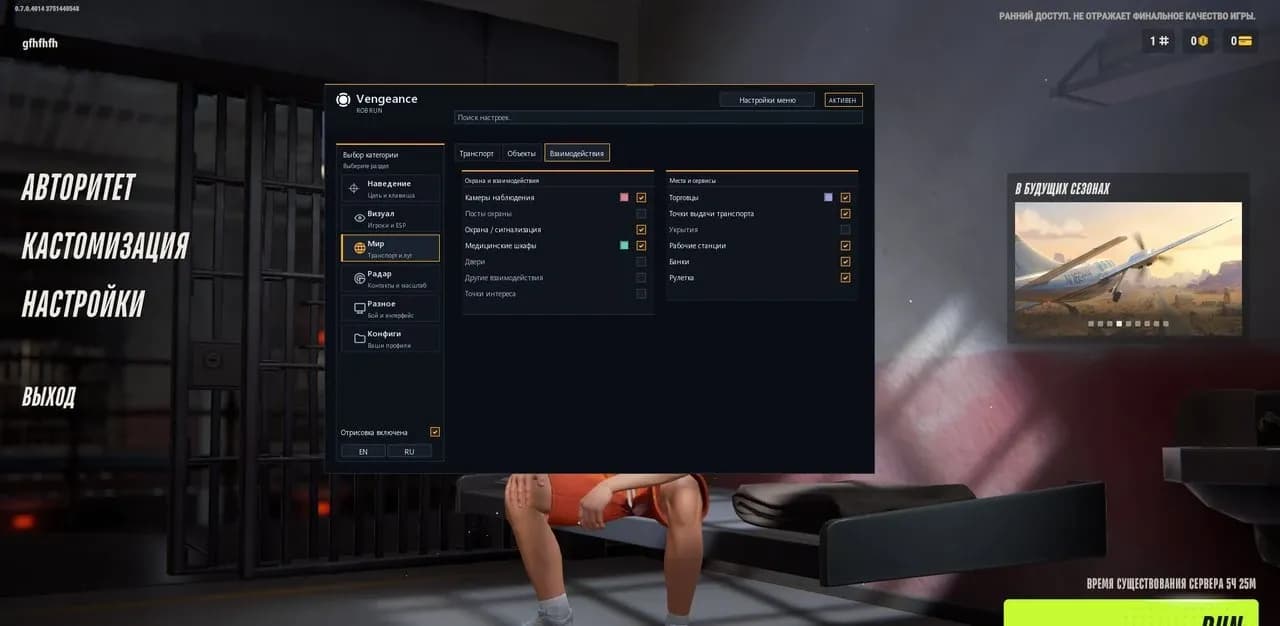
  • Menu Sections (Aim / Visuals / World / Radar / Misc / Config)
  • Hold-Key Aiming
  • Default Aim Key (Right Mouse Button)
  • Aim FOV (10 500 px)
  • Target Priority by FOV Center
  • Smoothing (1 30)
  • Target Bone (Pelvis / Chest / Neck / Head)
  • Maximum Targeting Distance (10 1000 m)
  • Separate NPC Targeting
  • Ignore Local Player
  • Ignore Dead Characters
  • Configurable FOV Circle Color
  • Aimbot Stops on Key Release
  • Aimbot Stops While Menu Is Open
  • Aimbot Stops on Game Focus Loss
  • Aimbot Stops When Fresh Data Is Unavailable
  • Enable Battle Mode
  • Default Toggle Key (F6)
  • Keyboard and Mouse Button Keybinds
  • Player ESP Remains Active
  • Radar Remains Active
  • Hide World Labels
  • Hide Vehicles
  • Clan Battle Attacker / Defender Filtering
  • Hide Local Side in Clan Battles
  • Hide Same-Clan Members in Open World
  • Police Treated as Allies When Playing Police
  • Ignore Dead Characters
  • Ignore Ordinary NPCs
  • Police NPC Filter
  • BATTLE MODE Indicator
  • Preserve Saved Category Filters
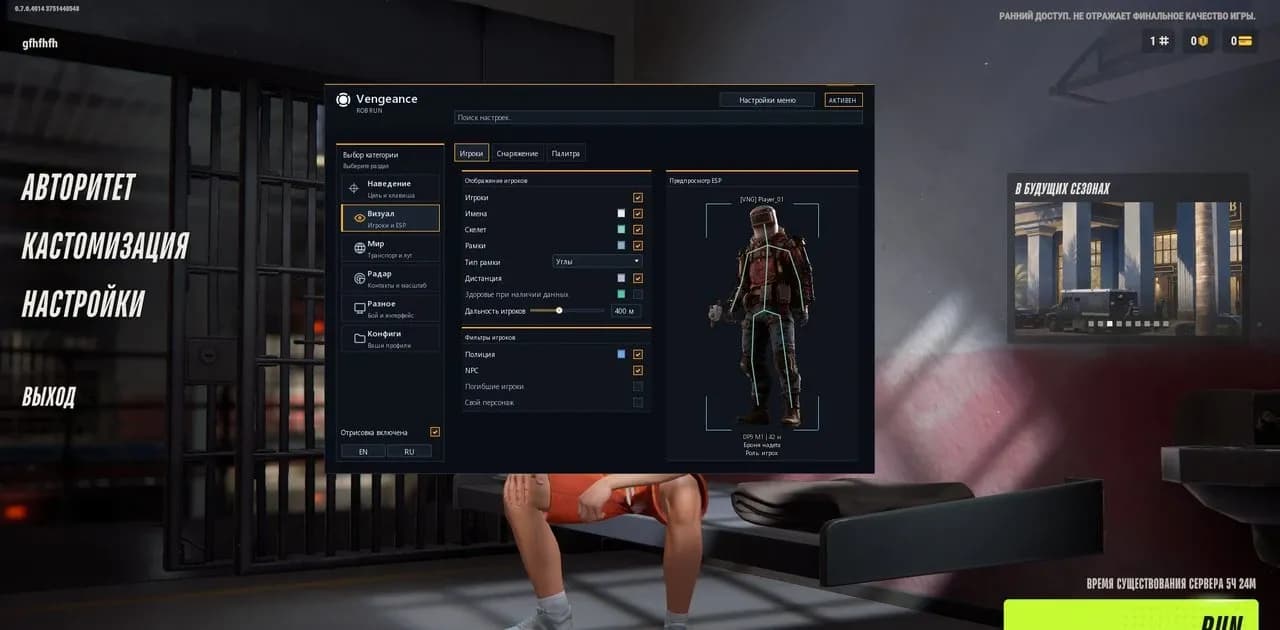
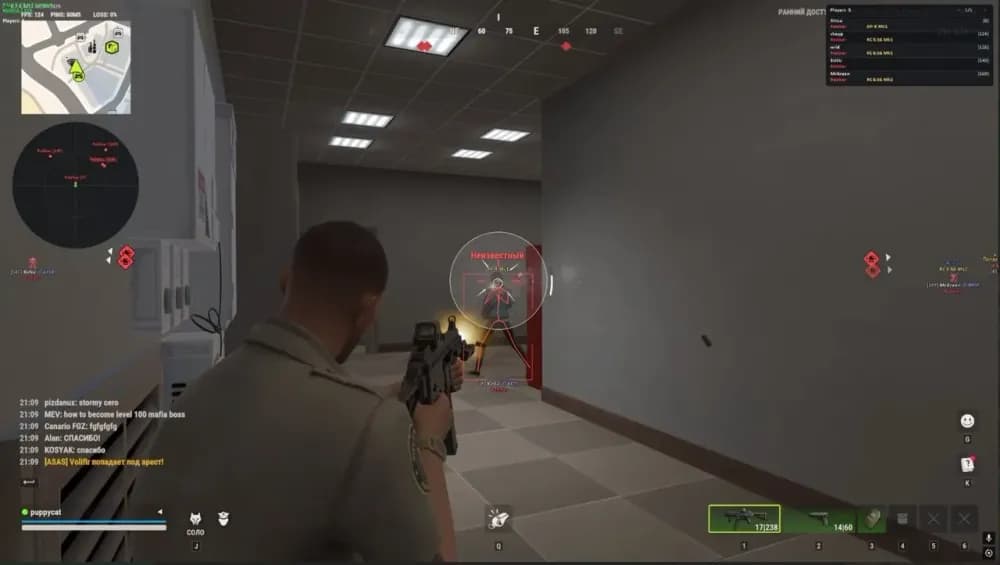
  • Players
  • Names
  • Clan Tags
  • COP Markers
  • Entity IDs
  • Skeleton
  • Smoothed Skeleton Joints
  • Full Boxes
  • Corner Boxes
  • Distance
  • Health Bar
  • Player ESP Distance (10 1000 m)
  • Separate Police Filter
  • Separate NPC Filter
  • Separate Dead Character Filter
  • Separate Local Player Filter
  • ESP Preview
  • Held Weapon / Item
  • Armor Indicator
  • Armor Amount / Durability When Available
  • Role
  • Clan Tag
  • Entity ID
  • Character State
  • Firing State
  • Sprinting State
  • Crouching State
  • Reloading State
  • Arrest State
  • Knockout State
  • Skeleton Thickness (1 4)
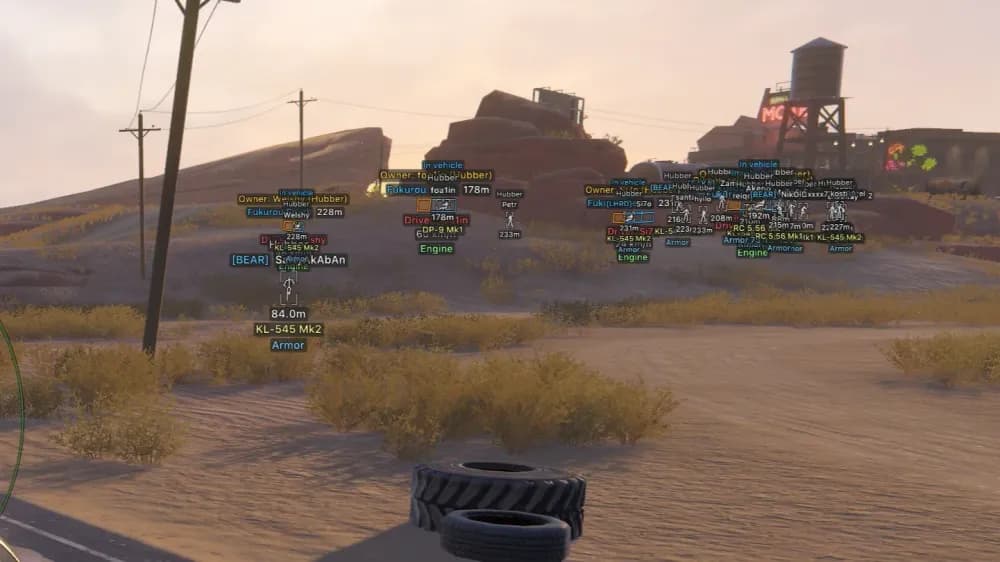
  • Car ESP
  • Helicopter ESP
  • Oriented 3D Boxes
  • Vehicle Name
  • Distance
  • Configurable Color
  • Configurable Opacity
  • Vehicle ESP Distance (20 1500 m)
  • Owner
  • Available / Unowned State
  • Detected Character Count
  • Engine State
  • Cargo Presence
  • Speed (km/h)
  • Separate Detail Toggles
  • Detail Distance (10 500 m)
  • Loose Item ESP
  • Cash ESP
  • Loot Node ESP
  • Bag ESP
  • Container ESP
  • Cargo ESP
  • Stack Count
  • Cash Amount
  • Vehicle Remains
  • Furniture Loot
  • Building Loot
  • Plot Loot
  • Show Empty / Taken Objects
  • Item Range (10 1000 m)
  • Overall World Range (10 1000 m)
  • Two-Row Labels
  • Object Name
  • Distance
  • Overlapping Label Suppression
  • Nearby Object Priority
  • Item Priority
  • Russian Item / Container / Vehicle Translation
  • Brief Marker Retention During Read Failures
  • Immediate Removal of Confirmed Missing Objects
  • Surveillance Camera ESP
  • Broken Camera Indicator
  • Guard Posts
  • Alarms
  • Security Panels
  • Medical Cabinets
  • Medical Locations
  • Doors
  • Interaction Points
  • Supported Vault Locations
  • Map Points of Interest
  • Traders
  • Vehicle Spawn Points
  • Vehicle Service Points
  • Hideouts
  • Workstations
  • Cargo Processing Locations
  • Exchange Locations
  • Banks
  • Roulette Locations
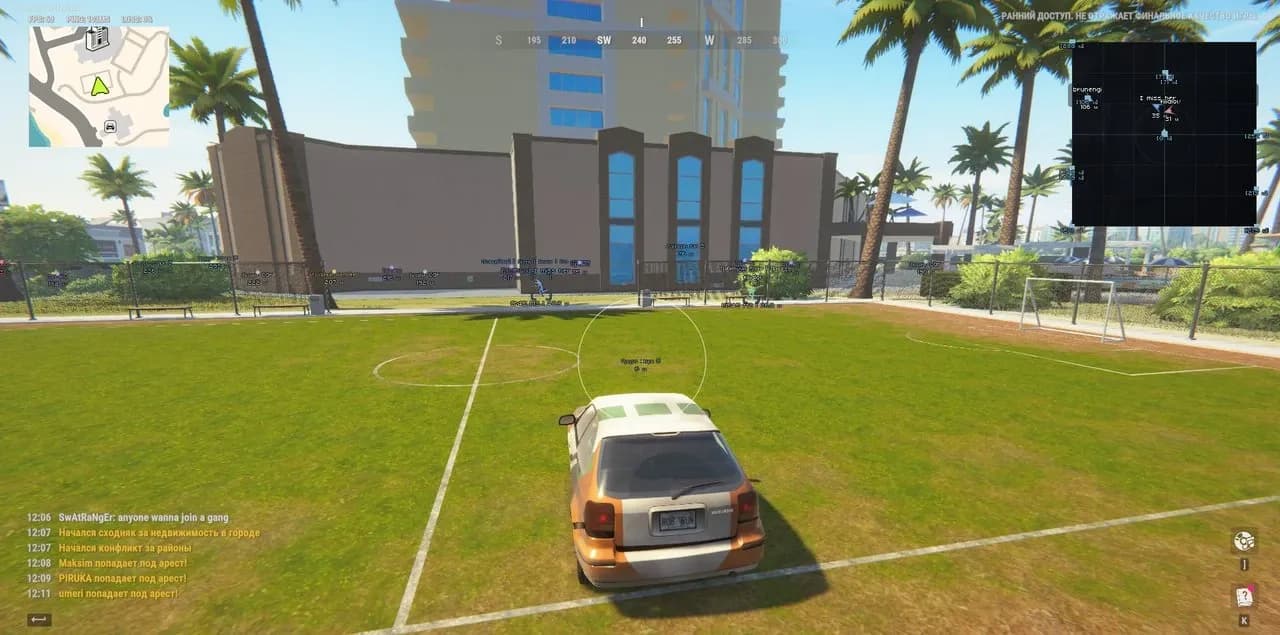
  • Grid Radar
  • Character Markers
  • Local Direction Arrow
  • Rotate with Camera
  • Radar Size (100 400 px)
  • Manual Zoom (0.05 5.00)
  • Adjustable X / Y Position
  • Character Direction Arrows
  • Names
  • Distances
  • Dim Distant Contacts
  • Clamp Distant Contacts to Radar Edge
  • Separate Vehicle Toggle
  • Vehicle Icons
  • Radar Labels
  • Independent Player Radar
  • Police Filter
  • NPC Filter
  • Battle Mode Filtering
  • Automatic Proximity Zoom
  • Smooth Zoom
  • Return to Manual Zoom
  • Reaction Range (30 500 m)
  • Maximum Auto Zoom (0.05 5.00)
  • Response Time (0.15 2.00 sec)
  • Ignore Same Clan
  • Ignore Dead Characters
  • Ignore Ordinary NPCs
  • Ignore Allied Police
  • Battle Mode Filters
  • Preserve Manual Zoom Baseline
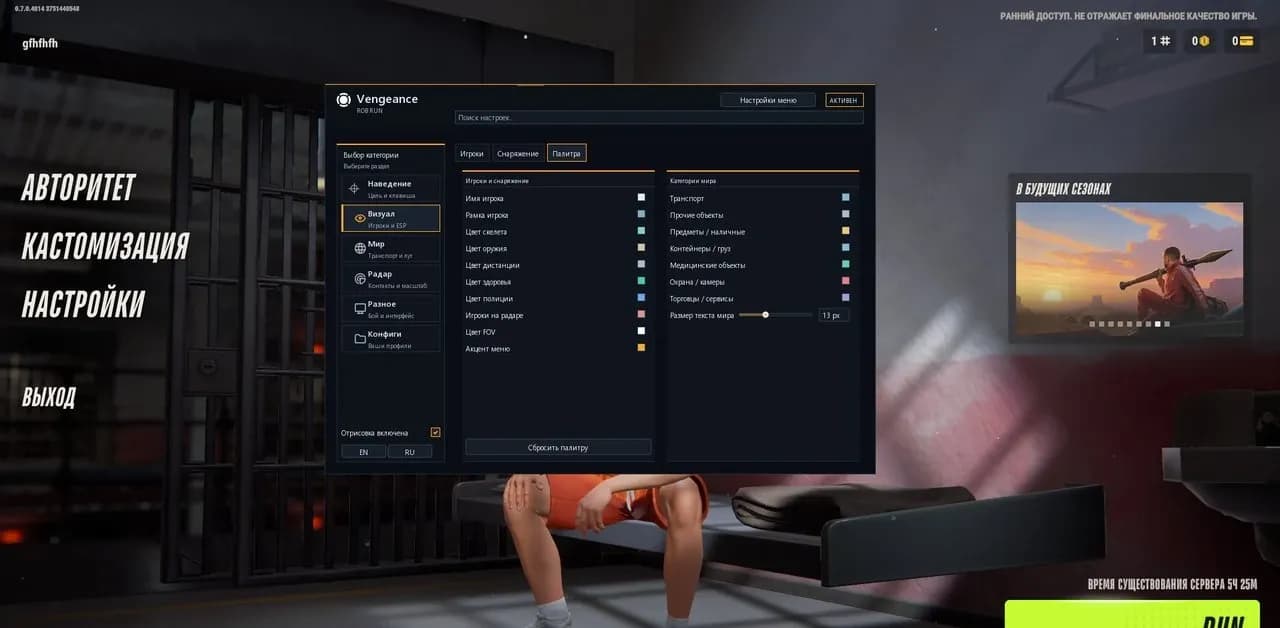
  • Name Colors
  • Box Colors
  • Skeleton Colors
  • Weapon Colors
  • Distance Colors
  • Health Colors
  • Police Colors
  • Radar Contact Colors
  • Vehicle Colors
  • Item Colors
  • Container Colors
  • Medical Object Colors
  • Camera Colors
  • Service Object Colors
  • Supported Element Opacity
  • FOV Color
  • Menu Accent Color
  • Restore Default Palette
  • World Label Size (9 20 px)
  • English Interface
  • Russian Interface
  • Instant Language Switching
  • Menu Scale (75% / 85%)
  • Automatic Screen Fitting
  • Animated Background
  • Search by English / Russian Setting Names
  • Player Diagnostics
  • Skeleton Diagnostics
  • Vehicle Diagnostics
  • Object Diagnostics
  • Read Time
  • Snapshot Age
  • Create Named JSON Profiles
  • Save Profile
  • Load Profile
  • Rename Profile
  • Delete Profile
  • Refresh Profile List
  • Autosave Current Configuration
  • Save Visual Settings
  • Save Aimbot Settings
  • Save Radar Settings
  • Save Battle Mode Keybind
  • Save Colors and Appearance
  • Ctrl+F4 Pauses Session Without Closing Discord
  • Game Exit Stops Session and Terminates Discord.exe Processes

Choose a plan

Get access · $4
  • Instant delivery
  • Remote setup help

Please check the system requirements before purchase. If your system does not meet the listed requirements, the product may work incorrectly or fail to launch. In this case, refunds are not provided, so please review them carefully.

Recommendation

Fecurity
Undetected

Fecurity

Rob Run

from$4
Pussycat
Undetected

Pussycat

Rob Run

from$3.50
Hidden
Undetected

Hidden

Rob Run

from$3
Arcane
Recommended

Arcane

Rob Run

from$4
UDP
Recommended

UDP

Rob Run

from$3

Description

Vengeance is a private multifunctional cheat for Rob Run available in Full and Lite versions. The Full version includes Aimbot together with Player ESP, Vehicle ESP, world-object tracking, Radar, Battle Mode and profiles, while Lite retains the visual and information features without aiming assistance. Separate controls allow the overlay and aiming system to be managed independently.

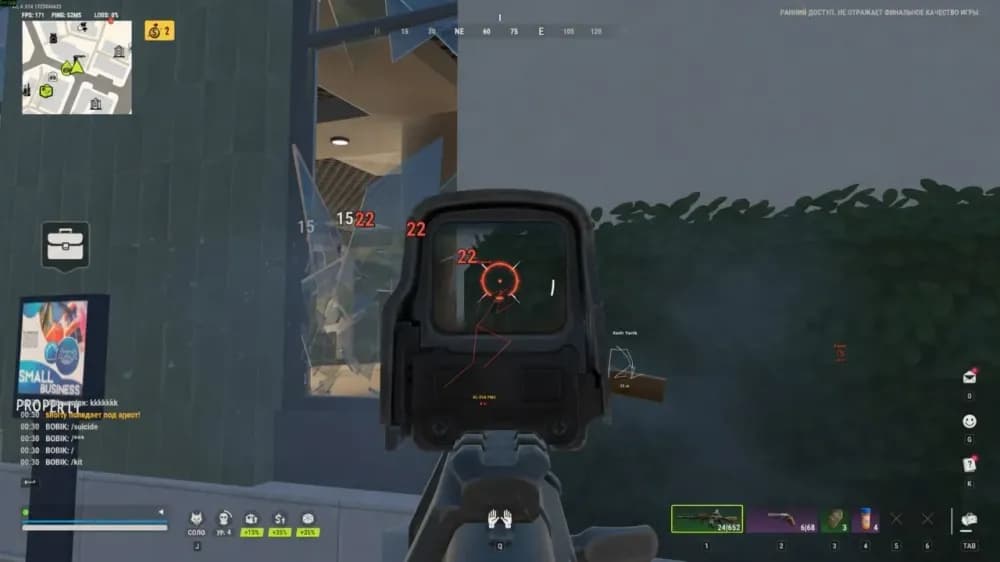
The Full version includes a hold-key Aimbot with adjustable FOV, smoothing, target bone and maximum targeting distance up to 1000 meters. Targets are prioritized by proximity to the center of the aiming area, while separate NPC targeting is available. Aiming automatically pauses when the activation key is released, the menu is opened, the game loses focus or current target data is unavailable.

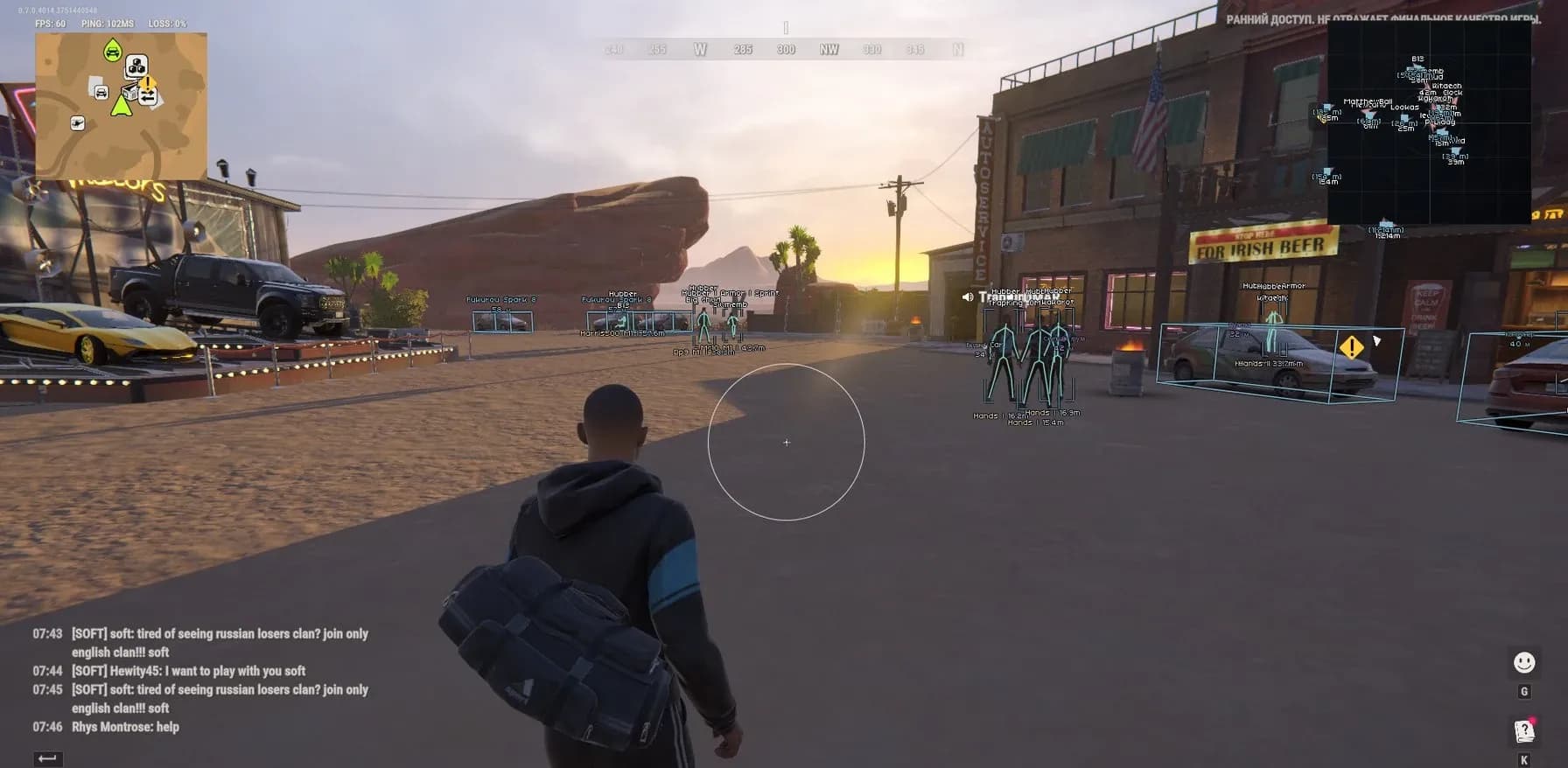
Player ESP can display names, clan tags, COP markers, entity IDs, skeletons, boxes, distance, health and detailed character states. Separate modules cover cars and helicopters, loose items, cash, containers, cargo, cameras, medical objects, interaction points and other map locations. Radar works independently from standard Player ESP and includes direction indicators, labels, adjustable zoom and an automatic proximity-based zoom system. Battle Mode keeps opponent information active while hiding unnecessary world labels and vehicles.

Vengeance supports the Steam version of Rob Run, Windows 10 and Windows 11, Intel and AMD processors and Windowed or Borderless modes. A built-in spoofer is not included. When the game is fully closed, the active session stops and Discord.exe processes are terminated; Ctrl+F4 can be used to pause the session without closing Discord. The product is maintained with an Undetected status in mind, although third-party software always carries some account risk.